AI Image and Video Creation
In 2025, the average time to produce a 60-second marketing video dropped from 13 days to 27 minutes. If your team is still spending weeks on visual production, you are burning budget that AI can recover in an afternoon.
Quick Summary
- AI image generators (Midjourney, DALL-E 3, Adobe Firefly) turn a text description into a still image in seconds.
- AI video generators (Runway, Kling, Sora, Pika) produce short clips from a text prompt, a still image, or a reference video.
- Traditional video production costs roughly $4,500 per minute. AI production costs around $400 per minute, a 91% reduction (Zebracat, 2025).
- 78% of marketing teams now use AI-generated video in at least one campaign per quarter.
- The hard skill is prompt writing and brand review, not clicking "generate."
What It Actually Is
AI image and video creation tools convert a plain-English description into a visual asset. You type what you want; the model produces it. No camera, no studio, no designer required for a first draft.
Think of it like a vending machine for visuals: you put in a description, pull a lever, and get an output. The difference from a real vending machine is that the output is never exactly predictable, which means your job shifts from directing a shoot to iterating on prompts until the machine produces something on-brand.
Two categories exist and they complement each other:
- Image generators: Midjourney, DALL-E 3, Adobe Firefly, Stable Diffusion. Input: text prompt. Output: still image. Best for product visuals, ad creatives, social thumbnails, and concept mockups.
- Video generators: Runway Gen-3, Kling, Sora, Pika, Luma Dream Machine. Input: text prompt or still image. Output: 5 to 60-second video clip. Best for short-form ads, product demos, and social content.
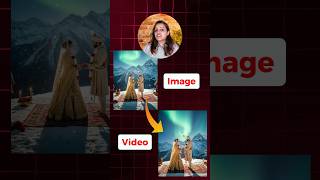
The two workflows connect naturally: generate a still image first, then animate it using an image-to-video tool. This two-step approach gives you far more control than going straight to text-to-video.
Why It Matters (with data)
The case for AI visuals in 2025 is no longer theoretical. The numbers are large enough that ignoring them is a strategic choice with real cost implications.
Cost:
- Traditional video production averages $4,500 per minute of finished content.
- AI-assisted production averages $400 per minute, a 91% cost reduction (Zebracat, 2025).
- A typical 10-video social media campaign costs roughly $89 through AI tools versus $100,000+ through a traditional production agency.
- Small businesses using AI video tools save 70 to 90% on visual production budgets.
Speed:
- The average 60-second marketing video dropped from 13 days to 27 minutes of production time (Zebracat, 2025).
- AI videos cut marketing campaign launch timelines by 41% on average.
- 57% of creative agencies report at least a 38% reduction in production timelines after adopting AI video tools.
Adoption:
- 78% of marketing teams now incorporate AI-generated video into at least one campaign per quarter (Zebracat, 2025).
- 73% of Fortune 500 companies have integrated AI video tools into their content workflows.
- 82% of ecommerce platforms now feature AI-generated product videos.
- The global AI video generator market was valued at $716.8 million in 2025 and is projected to reach $3.35 billion by 2034 (Grand View Research).
Performance:
- AI-generated interactive video ads achieve 52% higher engagement rates versus traditional ads.
- 78% of social media ads now use AI-generated or AI-assisted video.
- Over 55% of consumers say they prefer personalized AI-generated video content.
Use these tools when:
- You need more visual variants than your design budget allows.
- You want to A/B test creative concepts before committing to a full production.
- You are localizing content across 10+ markets and cannot afford 10 separate shoots.
- Your campaign timeline is shorter than a traditional production cycle.
How It Works: The Playbook
The process is a loop, not a linear pipeline. Plan for 3 to 8 iterations before landing on something publishable.
Step 1: Define the brief before opening the tool
Write down the format (square, 16:9, 9:16), the platform (LinkedIn, Instagram, YouTube), the audience, and any brand constraints (colors, tone, what NOT to include). Without this, you will iterate forever because you have no benchmark to judge against.
Step 2: Write a structured prompt
Kalshi's in-house creative team, using Google's Veo 3 text-to-video model A 30-second national-broadcast-quality commercial for the 2025 NBA Finals would normally cost seven figures and take months through traditional production The team wrote a script, broke it into a shot list, and iterated structured prompts through roughly 300 to 400 generations to land 15 usable clips, then edited them into a single ad
Result: The finished commercial aired during the 2025 NBA Finals for approximately $2,000 in production cost, completed in about 48 hours (Produced and aired within a 48-hour window during the June 2025 NBA Finals).
SourceA weak prompt produces a generic result. A strong prompt specifies six elements:
- Subject: who or what is in the image
- Setting: where the scene takes place
- Lighting: natural, studio, golden hour, rim light, etc.
- Style: photorealistic, illustration, 35mm film, flat design, etc.
- Mood: calm, urgent, playful, professional, etc.
- Format: square, landscape, portrait, aspect ratio
Example of a weak prompt: "a marketing image for a coffee brand."
Example of a strong prompt: "a young South Asian professional woman holding a white ceramic coffee cup, minimalist coworking space background, soft morning window light, warm tones, shot on 35mm film, photorealistic, 4:5 aspect ratio for Instagram feed."
Step 3: Generate and evaluate
Most tools produce 2 to 4 variations per generation. Evaluate each one against your brief checklist: Is the anatomy correct? Are there extra fingers or distorted faces? Does the color palette match your brand? Is any text in the image readable and accurate?
Step 4: Iterate with targeted refinements
Do not rewrite the entire prompt when one element is wrong. Isolate the problem: "add more background blur," "remove the text overlay," "make the lighting warmer." Surgical changes produce faster results than starting from scratch.
Step 5: Apply the brand layer
Snowflake's internal marketing design team, using an internal AI agent called CoCo Producing on-brand visual assets for fast-moving campaigns was bottlenecked on a small design team's manual turnaround time A designer used CoCo to take a task through ideation, generation, and brand-template application in a single AI-assisted pass instead of the usual multi-day manual process
Result: A task the designer described as a full week of work was compressed into about 20 minutes (Reported as part of Snowflake's 2025-2026 internal AI-native marketing rollout).
SourceAI tools do not know your brand. They do not know your exact hex codes, your logo placement rules, or your legal disclaimer requirements. Every AI output must pass through a brand template before it is published. Tools like Adobe Firefly and Canva AI allow you to upload a brand kit, which reduces but does not eliminate this step.
For video: use image-to-video as your starting point
Text-to-video is powerful but unpredictable. The safer workflow for brand-controlled content:
- Generate a high-quality still image using an image generator.
- Import that still into Runway, Kling, or Pika.
- Add motion: parallax shift, slow zoom, camera pan, ripple effect.
- Keep clips under 10 seconds for social use. Longer clips compound any errors.
The two-step method for controllable video: Generate your hero image in Midjourney or DALL-E first. Then import it into Runway Gen-3 or Kling and use the image-to-video feature to add subtle motion. You keep full control of the composition, background, and color palette from the still image phase, and you only add motion in the video phase. This dramatically reduces the chance of AI hallucinations, distorted objects, morphing faces, or logic-breaking movement, that plague pure text-to-video generation.
Real Company Examples
Coca-Cola: AI Remake of a Classic Ad (November 2024)
In November 2024, Coca-Cola released a fully AI-generated remake of its iconic 1995 "Holidays Are Coming" Christmas ad. The production team used Leonardo, Luma, Runway, and Kling to recreate the original environments and motion sequences frame by frame. The campaign ran globally across television and digital channels. The production required no location shoots, no travel budget, and no large crew. Coca-Cola repeated the experiment in November 2025 with a new AI-generated holiday ad produced by Secret Level.
Coca-Cola Holiday AI Ad (2024): Coca-Cola used a stack of four AI tools, Leonardo for image generation, Luma and Runway for video synthesis, and Kling for motion refinement, to recreate a 30-year-old beloved Christmas ad with zero location production. The campaign demonstrated that a brand with a large asset library can use AI to reactivate legacy creative without a studio budget. The key enabler was the brand's existing archive: AI tools work best when they have clear reference material to work from, not a blank brief.
H&M: AI Digital Twins of Real Models (2025)
In 2025, H&M developed AI-generated digital twins of 30 real-world models. These digital avatars, built with each model's explicit consent and compensated at the same rate as a physical shoot, appeared in ecommerce product listings, social media ads, and seasonal campaign assets across dozens of markets. H&M used this approach to generate localized creative at a speed that traditional photography could not match. The campaign ran across 95 markets with localized creative variations produced in weeks, not months.
Mango: First Major Fashion Brand Full AI Campaign (July 2024)
In July 2024, Mango became one of the first major fashion retailers to launch a campaign generated entirely with AI tools. The campaign was for its Teen line's Sunset Dream collection and ran in 95 markets. No models were flown to shoot locations. No sets were built. Every visual asset in the campaign, still images, video clips, social content, was AI-generated and brand-reviewed before publication.
Common Mistakes
Mistake 1: Publishing raw AI output without a review pass. The most damaging AI visual failures share a common cause: someone clicked "generate," liked the result at thumbnail size, and published it without zooming in. At 100% zoom, AI images frequently show anatomical errors (extra fingers, merged hands, asymmetric ears), text that is garbled or misspelled, brand colors that are off by a significant degree, and logo placements that violate brand guidelines. Build a mandatory 60-second checklist: finger count, face symmetry, text accuracy, color match, logo placement. This single step prevents the "AI fail" screenshots that end up going viral.
Mistake 2: Writing vague prompts and blaming the tool. "A professional marketing image" is not a prompt. It is a request with no information. The model will guess, and its guess will be generic. Every hour you spend learning structured prompt writing saves you five hours of iteration. Study the prompt guides for each tool you use, they are free and cover the specific syntax each model responds to.
Mistake 3: Using AI video for everything, including things it handles poorly. AI video generation in 2025 is excellent at: atmospheric scenes, product reveals, abstract motion, nature footage, and cinematic transitions. It is still unreliable for: sustained close-ups of human faces, hands, and fingers in motion, speech that requires lip-sync accuracy, and text that needs to be readable. Match the tool to the task.
Mistake 4: Skipping the brand layer step. AI tools generate on-trend visuals, not on-brand visuals. "On-trend" means whatever the training data has most of. "On-brand" means your specific color codes, your typography, your logo placement rules, and your tone. These are not the same thing. Always pass AI output through a brand template.
Mistake 5: Not keeping a prompt library. Most teams regenerate good prompts from scratch every time because no one saved the prompt that produced a strong result three weeks ago. After any successful generation, save the exact prompt, the tool, the settings, and the output in a shared document. Within two months you will have a prompt library that produces consistent results faster than starting from scratch each time.
Key Takeaways
- The cost and time barrier to visual content production has dropped 90%+ in the past two years, this changes what is feasible for every team size.
- AI image and video tools are iteration engines, not magic buttons. The skill is in the prompt and the review, not the generation.
- The two-step workflow (generate still image, then animate it) gives you more control and fewer errors than text-to-video from scratch.
- Every AI visual must pass through a brand review before publishing. The tool does not know your brand; you do.
- Major brands (Coca-Cola, H&M, Mango) are already running global campaigns at scale using these tools. Early movers are building workflows and prompt libraries that will compound as the tools improve.
- Save every prompt that works. A prompt library is the real competitive asset, not any single generated image.