Behavioral Email Triggers
What It Is
A behavioral email trigger is an automated email sent in direct response to something a subscriber did, or did not do. Instead of blasting the same message to your entire list on a fixed schedule, you send a targeted message because one specific person took one specific action.
Actions that trigger emails include: viewing a product page, abandoning a shopping cart, completing a purchase, clicking a link, reaching a usage milestone in an app, or going silent for 30 days. The trigger is the event. The email is the response.
This is fundamentally different from broadcast email (newsletters, promotions sent to everyone at once). Behavioral triggers are one-to-one in relevance, even when they run automatically at scale.
Real-World Example
Lands' End, the American clothing retailer, built a behavioral trigger program using first-party data: email activity, purchase history, browsing behavior, and product interest signals. They created more than 15 personalized trigger emails tied to specific customer actions. The result was a 158% higher conversion rate than the industry average, sustained over time because each email arrived at a moment of genuine intent.
Lands' End: 158% higher conversion rate with behavioral triggers
Lands' End replaced generic batch emails with 15+ trigger sequences tied to real customer actions, browsing, buying, clicking, and going quiet. Each email matched the moment. Conversion rates ran 158% above the industry average. The program worked because relevance beat frequency.
Why It Matters
Triggered emails generate up to 10 times more revenue than standard broadcast campaigns (Omnisend, 2024). Abandoned cart emails alone carry an average open rate of 45%, compared to roughly 20-25% for a typical newsletter.
The business problem behavioral triggers solve is relevance at scale. A human salesperson naturally follows up when a prospect shows interest. Behavioral triggers replicate that instinct automatically, for thousands of customers at once, without requiring a human to watch every click.
Use behavioral triggers when:
- You have an e-commerce store and need to recover lost revenue from cart abandonment
- You run a SaaS product and want to guide users through onboarding
- You sell high-consideration products with long decision cycles
- You want to re-engage subscribers who have gone cold
How It Works
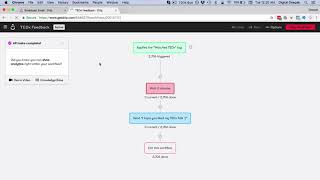
Every behavioral trigger system follows the same four-step logic: detect an event, evaluate whether it qualifies, send the right email, and measure what happens next.
Step 1, Define the trigger event. Be specific. 'Viewed product page' is too broad. 'Viewed product page and did not add to cart within 60 minutes' is a trigger.
Step 2, Set the wait window. Not every action needs an instant reply. A cart abandonment email works best 1-3 hours after the event. A re-engagement email works after 60-90 days of silence.
Step 3, Write to the moment. The email body should reference what the person actually did. 'You left something behind' works. 'We noticed you were browsing our winter jackets' works better.
Step 4, Define the exit condition. A trigger sequence must stop when the goal is achieved. If someone buys, they should not keep receiving cart abandonment emails.
Common Trigger Types
| Trigger | Timing | Goal |
|---|---|---|
| Welcome | Immediately on signup | Onboard, set expectations |
| Cart abandonment | 1-3 hours after abandonment | Recover lost revenue |
| Browse abandonment | 24 hours after session | Re-engage interest |
| Post-purchase | 1-3 days after delivery | Upsell, review request |
| Win-back | 60-90 days of inactivity | Re-engage or suppress |
| Milestone | On specific usage or date | Deepen loyalty |
Common Mistakes
The biggest mistake: triggering on too many events without exit logic.
Marketers set up triggers for every action and forget to connect them. A customer who buys after an abandoned cart email then receives a follow-up cart recovery email anyway, because the purchase did not cancel the sequence. This destroys trust fast. Always define what stops a sequence, not just what starts it. Map your triggers against each other before you launch, and test the full customer journey end to end.
Start with one high-value trigger, not ten average ones.
Cart abandonment or the welcome sequence will almost always outperform everything else combined. Nail the timing, the copy, and the exit logic on one trigger before you build the next. Complexity is the enemy of execution.
The One-Line Takeaway
Behavioral triggers work because they send the right message at the exact moment someone is thinking about you, not because a calendar said it was time.