Deliverability: SPF, DKIM, DMARC
What It Is
Email deliverability is the measure of how reliably your emails reach the recipient's inbox, not just their server. An email can be "sent" successfully and still end up in spam, the Promotions tab, or quietly deleted before anyone sees it. According to Validity's 2024 Email Deliverability Benchmark, roughly one in six legitimate marketing emails never reaches the inbox. The gap between "sent" and "seen" is where revenue quietly disappears.
Quick Summary
- Email authentication uses three DNS-based protocols: SPF, DKIM, and DMARC. Together they prove your emails are real and untampered.
- Gmail and Microsoft now actively reject (not just filter) bulk emails that fail all three checks, effective since early 2024 for Gmail and mid-2025 for Microsoft.
- SPF checks whether the sending IP address is authorized. DKIM checks whether the message body was modified. DMARC ties both checks to the visible From address your recipient sees.
- Fully authenticated senders are 2.7x more likely to reach the inbox than unauthenticated senders (Mailreach, 2025).
- Start DMARC at
p=noneto monitor traffic safely, then graduate top=quarantineand finallyp=rejectover 60 to 90 days.
Why It Matters
The scale of the problem is bigger than most marketers realize.
The global inbox placement rate in 2024 was approximately 83.5% (Validity). That sounds decent until you break it down: Gmail places 87.2% of emails in inboxes, but only 57.8% of those land in the Primary tab, the rest go to Promotions. Microsoft Outlook has a 75.6% inbox rate with a 14.6% spam rate. Organizations sending over 1 million emails per month face inbox placement below 28% on average, meaning more than 7 in 10 of their emails are filtered or rejected (Landbase, 2025). Authentication is your first and most impactful lever to fix this.
Here is why every email marketer needs to understand authentication:
- Provider enforcement is hard rejection now. Since May 2025, Microsoft and Gmail reject (not just filter) bulk emails that fail authentication. Bounce rates spike, sender reputation tanks, and future emails suffer even after you fix the issue.
- Domain spoofing destroys customer trust. Without DMARC, anyone can send email "from" your domain. Phishing campaigns using your brand damage customer relationships even though you did nothing wrong.
- Adoption gaps create a competitive advantage. DMARC adoption has grown fast, over half of internet domains now publish a record, but enforcement lags: only about 11.5% of domains sit at full
p=rejectenforcement, with another 19.8% atp=quarantine(EasyDMARC, 2026). Senders with full authentication stand out positively to inbox placement algorithms. - Authentication multiplies the value of every other optimization. At 80% deliverability, 20% of your work on subject lines, send-time testing, and segmentation is wasted before it even starts.
- BIMI requires DMARC enforcement. BIMI (Brand Indicators for Message Identification) is the standard that displays your logo in Gmail and Apple Mail inboxes. It only works at
p=quarantineorp=reject. Early deployers report up to 10% open rate lifts from logo visibility alone.
Real-World Examples
Heal Your Nervous System, Open Rates Up 84%, Enrollments Up 216% (2022)
Dr. Linnea Passaler, founder of the mental health brand Heal Your Nervous System (HYNS), watched her email open rates collapse from 30% to under 10% after launching new campaigns in early 2022. The problem was a deliverability failure, not content quality.
Her team ran inbox placement testing through GlockApps (a diagnostic tool), segmented her subscriber list by engagement level, and implemented proper authentication alongside ongoing deliverability monitoring via InboxAlly. The results: inbox placement climbed to over 90%, open rates recovered to a range of 39% to 84%, and enrollment in her new membership program increased by 216%. Her subscriber list also grew by 139% as a result of restored sender reputation.
The fix was almost entirely technical. The content was already good. Authentication and list health unlocked the audience that was already there.
UK HMRC, Inbox Rate Jumps from 18% to 98% After DMARC Enforcement
Before implementing DMARC, the UK tax authority HMRC had an inbox placement rate of just 18%. Fraudsters were spoofing the hmrc.gov.uk domain to run phishing campaigns. Receiving mail servers had no way to tell real HMRC emails from fakes, so they filtered everything cautiously.
After deploying DMARC with a p=reject policy, inbox placement climbed from 18% to 98%. In the first year, DMARC blocked over 500 million phishing emails impersonating HMRC. The improvement came entirely from authentication, no content changes, no new send times, no list cleanup required. For a commercial sender generating $500,000 annually from email, a 5-point deliverability lift from DMARC enforcement recovers roughly $25,000 to $50,000 per year in lost revenue.
How the Three Protocols Work Together
Think of it like airport security with three layers of checks. SPF is the passport check (is this sender on the approved list?). DKIM is the baggage seal (has anything been tampered with?). DMARC is the officer who verifies that the passport and the face on it actually match.
SPF (Sender Policy Framework)
SPF is a text record (called a DNS TXT record) published in your domain's settings. It lists every IP address and mail service authorized to send email on your behalf. When a receiving server gets an email claiming to be from yourcompany.com, it checks your DNS for the SPF record and verifies the sending IP is on the approved list.
Example SPF record:
v=spf1 include:mailchimp.com include:sendgrid.net ip4:203.0.113.5 ~all
The ~all at the end means "soft-fail anything not on this list" (mark as suspicious but deliver). The stricter -all means "reject anything not on this list." Use ~all during setup, then graduate to -all after testing.
SPF's blind spot: SPF checks the envelope sender (a technical Return-Path address used during sending), not the From: address your recipient actually sees. A spoofer can pass SPF while showing a completely different From address. This is why SPF alone is not enough.
DKIM (DomainKeys Identified Mail)
DKIM adds a cryptographic signature (think of it as a tamper-proof digital wax seal) to every outgoing email. Your sending mail server signs the message with a private key. A matching public key is published in your DNS. The receiving server fetches that public key and checks the signature, confirming two things: the email came from an authorized sender, and the message body was not changed in transit.
DKIM handles forwarded email better than SPF. When someone forwards your newsletter, SPF fails (different sending IP), but DKIM survives as long as the message body is unchanged.
DKIM's blind spot: DKIM validates a technical domain tag inside the email headers, which can differ from the visible From: address your recipient sees. A sophisticated spoofer can exploit this gap. DMARC closes it.
DMARC (Domain-based Message Authentication, Reporting, and Conformance)
Rakuten Card's email domain, a frequent target of phishing campaigns impersonating the brand to Rakuten's Japanese customer base Customer support was fielding a steady stream of calls from customers who had received spoofed 'Rakuten Card' phishing emails and could not tell them apart from real account notices Rakuten's security team rolled out DMARC on the Rakuten Card domain and moved the policy from monitor-only to enforcement at p=reject, blocking any message that failed SPF or DKIM alignment with the visible From address
Result: Phishing-related customer support call volume dropped by roughly 50% after enforcement went live (Presented at Rakuten Technology Conference 2019, reflecting the rollout completed that year).
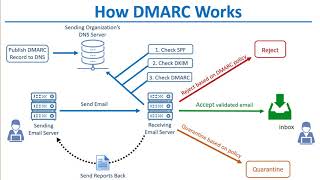
SourceDMARC closes the gap left by SPF and DKIM by adding "alignment." Alignment means the domain in the From: header (the address your recipient sees) must match the domain authenticated by SPF or DKIM. DMARC then gives the receiving server a policy telling it what to do when alignment fails.
A DMARC record looks like this:
v=DMARC1; p=quarantine; rua=mailto:dmarc-reports@yourcompany.com; pct=100
Here is what each part means:
p=none: monitor only, take no action (use this during initial rollout)p=quarantine: send failing emails to spamp=reject: block failing emails entirely (the end goal)rua=: where aggregate XML reports go (use a DMARC report processor tool, not your personal inbox)pct=: the percentage of emails the policy applies to (ramp from 10% up to 100% over several weeks)
DMARC also mandates reporting. Receiving mail servers send you XML reports showing how much mail is passing or failing authentication, and from which IP addresses. This visibility reveals forgotten tools, rogue ESP (Email Service Provider) configurations, and active spoofing attacks against your domain.
The Full Authentication Flow
Beyond Authentication: The Other Deliverability Pillars
Authentication gets your emails through the door. These factors determine where they land once inside.
Sender Reputation
Your sender reputation is a score that mail providers assign to your sending domain and IP address. It is built on your history of engagement and complaint rates. Key signals:
- Spam complaint rate: Keep this below 0.1%. Gmail's Postmaster Tools lets you monitor it directly. ActiveCampaign leads all major ESPs (Email Service Providers) at 94.2% inbox placement in 2025, partly because their platform enforces low complaint thresholds.
- Bounce rate: Keep hard bounces (permanent failures like invalid addresses) below 1.5%. Exceeding this can trigger provider-level filtering on your entire domain.
- Engagement history: Providers watch open rates, clicks, and whether recipients move your emails out of spam or delete without opening. Low engagement signals unwanted mail.
List Hygiene
Mailchimp's own platform-wide engagement data, sampled across roughly 30,000 accounts that had each sent at least 10 campaigns, list sizes ranging from 500 to 1.5 million subscribers Mailchimp wanted to settle, with its own send data instead of anecdote, whether requiring subscribers to confirm their email address at signup (double opt-in) actually produced a healthier list than accepting addresses immediately (single opt-in) Mailchimp compared engagement metrics between accounts using double opt-in confirmation versus single opt-in signup across its full sample
Result: Double opt-in lists showed a 72.2% increase in unique opens, a 75.6% increase in total opens, and a 114% increase in click rates versus single opt-in lists, with meaningfully lower bounce and unsubscribe rates (Study conducted on 2011 send data, still cited industry-wide as the reference benchmark for opt-in method).
SourceList hygiene means regularly cleaning your subscriber list to remove addresses that do not engage or cannot receive email. Nearly 60% of email senders now practice regular list cleaning (Mailreach, 2025), but only 23.6% verify lists before each campaign.
- Remove hard bounces immediately after each campaign.
- Suppress subscribers who have not opened any email in 90 to 180 days. Send a re-engagement sequence first, then remove non-responders.
- Use double opt-in (where subscribers confirm their address by clicking a link) for new sign-ups. It reduces list size but dramatically improves quality.
- Validate email addresses at the point of collection using a tool like NeverBounce or ZeroBounce.
Domain Warm-Up
If you switch to a new sending domain or IP address, you cannot immediately send thousands of emails. Mail providers have no reputation history for the new domain and will treat it with suspicion. Domain warm-up means gradually increasing send volume over 4 to 8 weeks, starting with your most engaged subscribers. Research shows domain warm-up increases inbox placement by approximately 20% (Mailreach, 2025).
Step-by-Step Implementation
- Audit every sending source. List every service that sends email from your domain: your ESP, your transactional email tool, your CRM, your helpdesk, your billing platform, calendar invites. Missing even one is the most common cause of broken SPF.
- Publish SPF using
~all(soft fail) to start. Verify it with MXToolbox or by runningnslookup -type=TXT yourdomain.com. Stay under the 10 DNS lookup limit. If you use more than 4 or 5 email services, use an SPF flattening service (dmarcian or EasyDMARC) to combine lookups into flat IP ranges. - Enable DKIM in every ESP. Each platform generates a key pair. You publish their public key as a DNS TXT record. Use 2048-bit keys minimum and rotate them annually.
- Publish DMARC at
p=nonewith arua=address pointing to a DMARC report processor (Postmark's free analyzer, Valimail Monitor, or dmarcian). - Read the reports for 2 to 4 weeks. Identify every source of mail that fails alignment. Fix each one before moving to the next step.
- Ramp to
p=quarantinestarting atpct=10, then increase to 25, 50, and 100 over several weeks. - Ramp to
p=rejectusing the same gradual approach. Most teams complete the full rollout in 60 to 90 days.
Common Mistakes
Mistake 1: Going straight to p=reject without auditing your senders first.
If any legitimate email service (helpdesk, billing tool, partner integration) is missing from your SPF record or lacks DKIM setup, those emails are immediately blocked when you enforce p=reject. Transactional receipts, password resets, and invoice emails vanish before customers see them. Always start at p=none, read the reports, fix every sending source, then ramp gradually.
Mistake 2: Exceeding the SPF 10 DNS lookup limit.
SPF allows a maximum of 10 DNS lookups during evaluation. Every include: statement counts as one lookup, and some includes chain to further lookups internally. Senders using 5 or more ESPs routinely exceed this limit, causing SPF to return a permanent error (permerror), which DMARC treats the same as a failure. Use an SPF flattening service to resolve all includes into flat IP ranges.
Mistake 3: Pointing rua= at a human inbox.
DMARC aggregate reports are XML files sent by every major mail provider that processes your email. A domain at moderate send volume receives dozens per day, each containing hundreds of rows of data. These files are unreadable without a parsing tool. Use Postmark's free DMARC analyzer, Valimail Monitor (free tier), or dmarcian. The reports are how you discover a forgotten marketing tool from three years ago that is quietly failing authentication every day.
Set up Google Postmaster Tools and monitor it weekly.
Google Postmaster Tools is a free dashboard from Google that shows your domain reputation, IP reputation, spam rate, and authentication pass rate specifically for Gmail (which holds roughly 35% of global email market share). It is the clearest signal available for how Google's filters view your sending practices. Connect it at postmaster.google.com using the domain you send from. If your domain reputation drops below "High," investigate immediately before it cascades into widespread filtering.
The One-Line Takeaway
Without SPF, DKIM, and DMARC at p=reject, Gmail and Microsoft do not filter your emails, they delete them before anyone has a chance to open them.