Apple Search Ads
If you ship an iOS app, Apple Search Ads (rebranded "Apple Ads" in 2024) is the closest thing to Google search advertising on iPhone. It is the only major channel where you can bid on raw, expressed intent, a user literally typing your competitor's name into the App Store. And because it lives inside Apple's privacy walls, it became far more valuable once Apple's ATT update (App Tracking Transparency) crippled targeting on Meta and TikTok in 2021.
Quick Summary
- Apple Search Ads puts your app at the top of App Store search results when users search relevant keywords
- The average tap-to-install rate is 67.2%, roughly 7 out of 10 people who tap your ad install your app
- Always use Advanced mode (not Basic), it gives you full keyword and audience control
- Structure campaigns into four types: Brand, Competitor, Generic, and Discovery
- iOS users generate more than twice the revenue of Android users despite fewer downloads, making the higher CPT worth paying
What It Actually Is
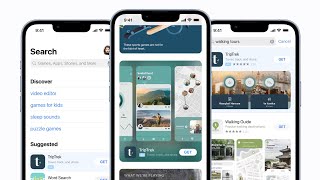
Apple Search Ads places sponsored results inside the App Store across four placements: the Today tab, the Search tab (suggestions), Search Results, and Product Pages ("You might also like"). The main placement is Search Results, a single sponsored slot at the top of every query.
Think of it like this: when someone searches "meditation app" in the App Store, you can pay to appear above the free organic results. The user sees "Ad" in a blue badge next to your app.
It runs on a cost-per-tap (CPT) auction. You only pay when someone taps your ad, not for impressions (views). There are two products:
- Search Ads Basic: a simplified model capped at $10,000/month per app, where Apple manages bids automatically
- Search Ads Advanced: full keyword and audience control, no budget cap, what every serious advertiser uses
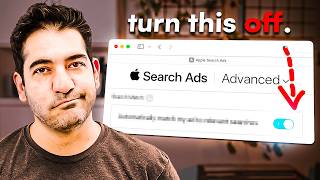
Always use Advanced. Basic hands over control to Apple's algorithm, which optimizes for installs rather than revenue.
Apple Ads is the only iOS channel with deterministic, user-level attribution built in, no opt-in required. Since iOS 14.5's ATT prompt gutted IDFA-based tracking on Meta and TikTok, Apple Ads became the cleanest attribution path on iOS. On April 10, 2025, Apple Ads also registered with AdAttributionKit, letting advertisers measure post-install events alongside SKAdNetwork 4.0 postbacks.
Why the Numbers Make This Channel Special
The benchmarks make the case better than any sales pitch.
According to SplitMetrics' Apple Ads Search Results Benchmarks Report 2025, the average tap-to-install conversion rate hit 67.2% in 2024, up from 65.37% the year before. That is not a typo, roughly seven of every ten taps become an installed app. No other paid channel comes close to that.
Compare that to a typical Facebook ad campaign, where getting 5-10% of clicks to convert to a purchase is considered good.
The reason for this high rate is simple: the person is already in the App Store searching for something. They have high intent (meaning they already want what you have). You are not interrupting someone scrolling through photos, you are answering a question they just asked.
The trade-off is rising cost as more advertisers pile in:
| Metric | 2023 | 2024 | 2025 |
|---|---|---|---|
| Average CPT (cost per tap) | $1.59 | $2.50 | $2.25 |
| Average CPA (cost per install) | $2.58 | $2.90 | $2.51 |
| Average Conversion Rate | 65.37% | 67.2% | 66.2% |
| Average Tap-Through Rate | , | , | 9.7% |
Category spreads are wide. Sports apps average over $14.10 CPA while utilities and games sit well under $2. Finance and Sports are the most competitive and expensive categories.
There is also an important fact about iOS users as a customer base: according to Statista data cited by SplitMetrics, iOS users generate more than twice the revenue of Google Play users despite having roughly half the number of downloads. That higher customer lifetime value (LTV, how much a customer spends over time) justifies paying a higher CPT.
How the Campaign Structure Works
Apple Search Ads Advanced, US App Store, productivity category A small productivity app wanted to test whether structured Apple Ads spend could move App Store category ranking, not just drive raw installs Ran a small Apple Search Ads Advanced budget with keyword-level structure and tracked which keywords received ad clicks versus which did not
Result: Just under $200 of spend produced 371 downloads at a $0.50 cost per download, more than quadrupled daily installs, and pushed the app to an all-time-high hourly category rank of 431 in US Productivity; keywords that received ad clicks reached top-10 organic rankings while non-clicked keywords barely moved (Single test campaign, reported October 2023).
SourceThe single biggest lever in Apple Search Ads is how you organize your campaigns. Most advertisers who waste money are using one campaign for everything. The right approach is four distinct campaign types, each targeting a different stage of user intent.
1. Brand Campaign Bid on your own app name and common misspellings. This seems unnecessary if you already rank #1 organically, but competitors are bidding on your name. The cost to defend your brand term is often $0.15-0.30 CPT, the highest-ROI spend in your entire account.
2. Competitor Campaign Bid on rival app names (for example, if you make a habit tracker, bid on "Streaks" or "Habitica"). These are the most expensive keywords, CPT can be 3-5x higher than generic terms. But it is the only place on iOS where you can systematically intercept users who are actively looking for a competitor.
3. Generic/Category Campaign Bid on what your app does: "habit tracker", "budget planner", "meditation timer". These keywords have lower conversion rates than brand terms but a much wider audience. Use exact match here to control what you pay for.
4. Discovery Campaign This is your keyword-mining machine. Turn on Search Match (Apple's automated keyword matching) and broad match. Add every other campaign's keywords as negatives (keywords you do NOT want this campaign to bid on). Any search term that converts twice or more gets harvested: move it as an exact-match keyword into one of the other campaigns and add it as a negative here so you stop paying discovery rates for it.
A fitness app launched in early 2024 used this exact four-campaign structure. Their brand campaign ran at $0.22 CPT with an 82% conversion rate. Their discovery campaign found "7 minute workout" as a high-converting term they had not thought of, it was generating installs at $1.80 CPA. After moving it to an exact-match ad group with a matching Custom Product Page showing the 7-minute workout feature, CPA dropped further to $1.40. Education category apps in 2025 benchmark at roughly a $1.80 CPT and 70%+ tap-to-install rate, per AppTweak's 2025 data, meaning roughly $2.57 CPA on a user whose first action was typing a specific learning intent into the App Store.
Custom Product Pages: The Hidden Multiplier
App Store Custom Product Pages, paired with paid-social UGC creative ODXClub already knew which user-generated-content creator resonated on paid social and wanted to test whether the same creative logic would lift App Store conversion Built one Custom Product Page using imagery from the best-performing content creator from their paid social campaigns, then routed matching ad traffic to it instead of the default product page
Result: That single CPP test produced a 56.3% increase in conversion rate versus the default product page (One CPP test).
SourceApple lets you create up to 35 Custom Product Pages (CPPs) per app. A CPP is an alternate version of your App Store listing with different screenshots, preview videos, and promotional text.
The standard mistake is sending every ad to the same default product page. If your keyword is "budget planner" but your default page opens with "track your investments and build wealth", you create a mismatch. The user searched for budgeting. They see investing. They leave.
Match each ad group's keyword theme to a CPP that reflects exactly what the user was searching for:
- "meditation for sleep" keyword, CPP shows sleep sounds and sleep timer screenshots first
- "run tracking app" keyword, CPP shows GPS maps and pace charts first
- "language learning" keyword, CPP shows lesson progression and streak features first
This single change can lift conversion rates by 15-30% on targeted keyword groups.
Advanced Optimization: Bid Strategy and Share of Voice
Once your campaigns are running and collecting data, shift your optimization lens from CPA (cost per install) to ROAS (return on ad spend, how much revenue you make for every dollar spent).
A key insight from practitioners: 80% Share of Voice (SoV) at 3.5x ROAS generates more total profit than 30% SoV at 4.2x ROAS, because you are capturing far more volume. Target 70-90% SoV on your best-performing keywords before widening to new ones.
Geographic segmentation also matters more than most guides mention. Organize markets into tiers:
- Tier 1: United States (run separately), United Kingdom, Germany, Australia, Canada, Netherlands, Switzerland
- Tier 2: Czech Republic, Hungary, Estonia, Portugal
Tier 2 markets often deliver better ROAS because competition is lower while user purchasing power is still reasonable.
Timeline for new campaigns:
- Days 1-7: Collect data, do not optimize yet (too little signal)
- Days 7-14: First bid adjustments based on early keyword performance
- Days 30-60: Restructure based on which exact-match keywords are profitable
- Days 60-90: Scale winners, test new CPPs, add geographic tiers
Common mistakes that waste budget:
- Leaving Search Match on in every campaign. Search Match is for discovery only. Once a keyword converts reliably, harvest it into exact match and turn off Search Match in that ad group.
- Ignoring negative keywords. Without aggressive negatives, your generic campaign bids on competitor terms at competitor CPT rates (often 3-5x higher than generic terms).
- Using one CPP for everything. Mismatched creative vs. keyword intent can cut your conversion rate in half.
- Optimizing to CPA instead of LTV. Apple's MMP (Mobile Measurement Partner) integrations and AdAttributionKit now expose subscription and retention events. Bid on the LTV cohort, not just the install count.
- Skipping the brand campaign because you "already rank #1 organically." Competitors will bid on your name. Defending it at $0.20 CPT is almost always the best ROI in your account.
- Premature optimization. Wait at least 7-14 days before making significant changes. Under-data decisions are worse than no decisions.
The Privacy Advantage (Post-ATT)
This section is important for understanding why Apple Ads has become more strategically valuable since 2021, not less.
When Apple launched the ATT (App Tracking Transparency) framework with iOS 14.5, it required apps to ask users for permission before tracking them across other apps. Most users say no. This broke the targeting and attribution models that Meta (Facebook/Instagram), TikTok, and Snap relied on for iOS campaigns.
Apple Search Ads was exempt from ATT. Apple can track what happens after someone taps an Apple Search Ad because it is a first-party interaction, Apple owns both the ad and the App Store. This means:
- You get deterministic (exact, not estimated) attribution on every Apple Ads install
- No statistical modeling or probabilistic matching needed
- You know exactly which keywords drove installs, trials, and subscriptions
This makes Apple Ads data more reliable than any other iOS channel. Even if your Meta campaigns have lower CPT, the attribution quality on Apple Ads is higher, you can trust the numbers.
Real-World Case Studies
Duolingo, The language learning app has publicly credited Apple Search Ads as a top-three iOS acquisition channel. With Education category apps benchmarking at $1.80 CPT and 70%+ tap-to-install rates in 2025 (per AppTweak), Duolingo's ability to match keyword intent to Custom Product Pages in 35+ languages makes this channel particularly efficient for them.
iOS LTV vs. Android comparison, According to Statista data cited by SplitMetrics' 2025 guide, iOS users reach $3.17 LTV by day 60 while Android users reach roughly $0.02 in the same period. This 150x difference in 60-day LTV is why companies like gaming studios, subscription apps, and finance tools accept paying $2.90+ CPA on Apple Ads while paying much less on Android channels.
The One-Line Takeaway
Apple Search Ads is the only place on iOS where you pay to answer a question someone is already asking, and seven out of ten people who tap become users.