Zapier Automation for Marketers
Zapier is a tool that connects your apps and makes them talk to each other automatically. When something happens in one app (like a new lead filling a form), Zapier instantly does something in another app (like adding that lead to your CRM and sending you a Slack message). As of 2026, over 2.2 million businesses use Zapier across 8,000+ supported apps. The platform's annual recurring revenue has climbed toward $400M, roughly doubling since 2023. That growth signals something important: automating repetitive marketing tasks has moved from "nice to have" to standard operating procedure for competitive teams.
Quick Summary
- Zapier connects apps without code, you set up "if this happens, do that" rules called Zaps
- Each Zap has a Trigger (the event that starts it) and one or more Actions (what happens as a result)
- Marketing automation delivers an average ROI of 544%, meaning every $1 spent returns $5.44 on average (Forrester)
- Start with your highest-volume, most repetitive task and automate just that one thing first
- The free plan gives 100 tasks per month and 5 Zaps, enough to test the approach before spending anything
What Is Zapier, Actually?
Think of Zapier as a universal translator sitting between your apps.
Without Zapier, each tool you use is an island. A lead fills your Typeform. You manually copy their details into your CRM. You remember (sometimes) to add them to your email list. You try to ping your sales team on Slack. Each step is manual, slow, and prone to being skipped.
With Zapier, the moment someone fills that Typeform, all of those things happen automatically in under 10 seconds, while you are asleep, in a meeting, or doing something that actually requires your brain.
The vocabulary you need to know:
- Zap: one complete automation. "When X happens in App A, do Y in App B."
- Trigger: the event that starts the Zap (new form submission, new email, new payment, new row in a spreadsheet)
- Action: what Zapier does after the trigger fires (create a contact, send a message, update a spreadsheet)
- Task: one execution of one action step. Zapier's pricing is based on how many tasks you use per month.
- Multi-step Zap: a Zap with one trigger and multiple actions (create CRM contact AND send Slack alert AND add to email list)
- Filter: a condition that controls when a Zap runs (only trigger if the country is "United States," only if deal value exceeds $500)
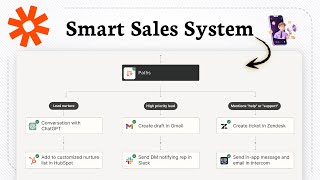
- Paths: branching logic, like an if/else. Send high-value leads one way, low-value leads another way.
Zapier's pricing is based on "tasks." Each time an action step runs, it counts as one task. A 3-action Zap that runs 100 times per month uses 300 tasks. The free plan gives 100 tasks per month and 5 Zaps. Starter ($20/month) gives 750 tasks. Most small marketing teams land on Professional ($49/month) for 2,000 tasks, unlimited Zaps, and filters. Enterprise teams average $48,000 per year according to Zapier's 2026 revenue breakdown.
How a Zap Actually Works
Every Zap follows the same structure. Understanding this lets you design any automation.
Zapier polls your trigger app for new events on a schedule. Free and Starter plans check every 15 minutes. Professional and above check every 2-5 minutes. When a new event is detected, Zapier runs all action steps in sequence and logs the result.
The 10 Most Valuable Marketing Zaps
These automations save the most time for the most marketers. Start with whichever matches your biggest pain point.
1. Lead Capture to CRM
Trigger: New form submission (Typeform, Gravity Forms, Facebook Lead Ads, LinkedIn Lead Gen Forms) Action: Create or update contact in CRM (HubSpot, Salesforce, Pipedrive)
This is the most common Zap in marketing. Research consistently shows that responding to a lead within 5 minutes increases conversion probability by 9x compared to waiting 30 minutes. Manual copy-paste is the enemy of speed.
Autotorino, an Italian auto dealer group operating 74 locations and 23 brands Sales inquiries, service bookings, and lead forms from dozens of sources each required someone to manually type the data into Salesforce before anyone could act on it Rebuilt lead intake as 109 production Zaps, each lead source with its own trigger, writing clean, formatted records straight into Salesforce the moment they're captured
Result: Returned 2,394 hours to the CRM team in a single year and largely eliminated copy-paste errors in the pipeline reporting data (2025).
Source2. Lead Notification to Sales Team
Trigger: New contact created in CRM Action: Send Slack message to #sales-leads channel with name, company, source, and lead score
Context matters in the notification. Include which form the lead filled, which campaign drove them, and which page they came from. That context tells a salesperson whether to call in 5 minutes or tomorrow morning.
3. Email List Sync
Trigger: New contact created or tagged in CRM Action: Add subscriber to the correct Mailchimp or Klaviyo audience with the correct tags
This eliminates the export-import cycle that causes list drift, the problem where your CRM and email tool have different data for the same person.
Shapeways, a 3D printing marketplace, ran email through Mailchimp Sending the same generic email to their whole list meant most subscribers ignored campaigns that were irrelevant to what they actually printed or bought Used Mailchimp's tags combined with Zapier automations to sync tag-based segments automatically, so each audience only received campaigns relevant to their behavior, without manually pulling lists
Result: Saw as much as a 238% increase in open rates and a 525% increase in click-through rates compared to their audience average (Documented in Mailchimp's published customer story).
Source4. Blog Post to Social Publishing
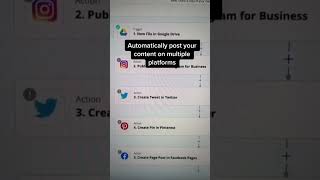
Trigger: New post published in WordPress (or new row in Airtable content calendar) Action: Post to LinkedIn, Twitter/X, and Facebook automatically
This saves roughly an hour per content piece for most marketing teams. The content goes out the moment it publishes, not whenever someone remembers.
5. Webinar Registration to Nurture Sequence
Trigger: New Zoom or Eventbrite registrant Action: Add to HubSpot with tag "webinar-registered" and enroll in a pre-event email sequence
No more manual Zoom-to-email-list migration before each event. The moment someone registers, the nurture sequence starts.
6. E-commerce Purchase to Email Segmentation
Trigger: New completed order in Shopify or WooCommerce Action: Tag customer in Klaviyo by product category purchased and trigger a post-purchase flow
This is how e-commerce brands build "purchased X but not Y" segments automatically, enabling cross-sell campaigns without anyone touching a spreadsheet.
7. Survey Response to CRM Note
Trigger: New Typeform NPS or feedback response Action: Find the matching CRM contact and add the score and response text as a note on their record
Feedback stops living in survey tool silos and becomes part of the contact record where sales and support can actually see it.
8. Hot Lead to Retargeting Audience
Trigger: Contact tagged "hot" or "SQL" (sales-qualified lead) in CRM Action: Add to Facebook Custom Audience for retargeting ads
Instead of manually uploading CSV lists to Facebook Ads Manager every week, your hottest leads are automatically added to a retargeting audience the moment they hit the right score.
9. Google Ads Lead Form to CRM
Trigger: New lead from Google Ads Lead Form Extension Action: Create HubSpot contact and trigger an email follow-up sequence
Google's native Lead Form ads have no automatic CRM integration. Leads sit in the Google Ads interface until someone downloads them. Zapier fixes this immediately.
10. Payment Received to Deal Closed
Trigger: Invoice paid in Stripe or QuickBooks Action: Move deal to "Closed Won" in CRM, send a thank-you email, and create an onboarding task for the success team
The sales cycle close is usually logged manually and often delayed. This closes the loop automatically the moment payment hits.
Real Results From Real Teams
Influencer marketing agencies (2024-2025): A study published by Influencers Time in 2025 tracked mid-sized influencer marketing agencies using Zapier to automate campaign workflows: auto-tagging new creator contacts, routing campaign briefs, and syncing deliverable tracking to Google Sheets. Agencies that automated these handoffs cut campaign launch time from 11 days to 6 days on average, a 45% reduction. The time savings came from eliminating copy-paste between their outreach tool, CRM, and project management software.
Small marketing teams using Zapier as a force multiplier (2023-2024): According to Zapier's own customer research, teams that automate lead routing and notification workflows see response times to new leads drop by 60-70% on average, without hiring additional staff. A solo founder or two-person marketing team with well-built Zaps can operationally match what a five-person team does manually. This explains why 94.7% of marketers using automation tools classify them as "mission-critical infrastructure" (Salesforce State of Marketing, 2025).
How to Build Your First Zap in 20 Minutes
Step 1, Identify your pain point. What do you do manually more than 5 times per week? Write it as a sentence: "When [event in App A] happens, I always have to [action in App B]."
Step 2, Go to zapier.com, sign up for free, and click "Create Zap."
Step 3, Set your trigger. Search for your trigger app (example: "Typeform"). Choose the event type (example: "New Entry"). Connect your account using OAuth, you just click "Allow." Select the specific form. Click "Test Trigger", Zapier pulls in a recent submission so you can see the exact data fields available.
Step 4, Set your action. Search for your destination app (example: "HubSpot"). Choose the event type (example: "Create Contact"). Connect your account. Map the fields: drag Typeform's "Email" field to HubSpot's "Email" field. Click "Test Action" to create a test contact.
Step 5, Name your Zap and turn it on. It runs automatically from this point forward. You will see every run logged in the Zap's history.
Common Mistakes to Avoid
Mistake 1, Skipping the test. Zapier has a built-in test feature for both triggers and actions. Always run a full test with real sample data before turning a Zap on. Blank fields, unexpected data formats, and app permission issues only reveal themselves during testing.
Mistake 2, Building before mapping. Open a blank doc and write out the full logic first: "When X, AND if Y, then do A then B then C." Marketers who jump straight into the Zapier interface often discover broken logic three steps into a 5-action Zap.
Mistake 3, Ignoring task volume. A single high-traffic lead form can burn through a free plan in days. Estimate before you build: if you get 400 form submissions per month and your Zap has 3 action steps, that is 1,200 tasks per month. Plan your tier before you launch.
Mistake 4, No error notifications. Zaps can fail silently if an app connection expires or an API limit is hit. Set up email notifications for Zap errors in your Zapier account settings so failures do not go undetected for days.
Zapier vs. Make vs. n8n: Which One to Use
Zapier is not the only automation tool. Here is the honest comparison:
| Tool | Best For | Pricing Model | Technical Skill Needed |
|---|---|---|---|
| Zapier | Non-technical marketers, fastest setup, 8,500+ apps | Per task | None |
| Make (formerly Integromat) | Complex branching logic, more affordable for high volume | Per operation (cheaper) | Low |
| n8n | AI agent workflows, self-hosting, unlimited runs | Per execution or self-hosted free | Moderate |
Use Zapier if: You are a marketer without a developer, you want to launch in an afternoon, and you need reliable connectors for mainstream apps (HubSpot, Salesforce, Mailchimp, Shopify, Slack, Google Workspace).
Switch to Make if: Your Zaps have become complex 10-step workflows with lots of branching, and Zapier's task costs are becoming significant.
Consider n8n if: Your team has a developer who can manage a hosted instance, and you need to chain LLM (AI model) calls into your automation workflows.
Zapier + AI: What's New Since 2025
Zapier added "AI Actions" and native ChatGPT/Claude integration in 2024-2025, and AI steps have kept expanding since. This opens up a new category of automations:
- Auto-summarize inbound emails before routing them to the right team member
- Score a new lead by sending their job title and company to ChatGPT and getting back a score from 1-10, then routing based on that score
- Generate a personalized first email draft based on a lead's LinkedIn profile data the moment they enter your CRM
- Classify support tickets by sentiment and topic before assigning to agents
By H1 2026, 1.2 million Zapier workflows included at least one AI agent step, a 340% year-over-year increase. AI-assisted Zaps are no longer advanced; they are becoming the default for lead scoring and content workflows.
The fastest way to add AI to your existing Zaps: add a "ChatGPT" or "Claude AI" action step that takes the raw data from your trigger and returns a transformed version. For example: trigger on a new support ticket, send the ticket text to Claude with the prompt "Classify this as billing, technical, or general, and rate urgency 1-3," and use that classification to route the ticket to the right Slack channel. This entire Zap takes about 15 minutes to build.
The One-Line Takeaway
Zapier does not save you a few minutes, it gives you back the hours your team was spending on work that no human should ever have to do twice.