Internal Linking & Site Architecture
Internal linking is the practice of connecting one page on your website to another page on the same website. When you read a blog post and click a highlighted phrase that takes you to a different article on the same site, that is an internal link. It sounds simple, but how deliberately you build those connections determines how well your pages rank in search engines.
Think of your website as a city. Each page is a building. Internal links are the roads between them. A city with no roads leaves buildings isolated and unreachable. A city with well-planned roads lets people (and delivery trucks) get anywhere efficiently. Search engines work the same way: they send automated "crawlers" (programs that scan pages) to follow links and discover content. If a page has no links pointing to it from anywhere else on your site, crawlers may never find it, or may not treat it as important enough to rank.
Quick Summary
- Internal links help search engines discover and rank your pages, no link pointing to a page means Google may ignore it entirely
- Links pass "authority" (called PageRank or link equity) from one page to another, use this to boost your most important pages
- The topic cluster model (one big pillar page, many linked subtopic pages) is the most effective internal linking architecture today
- Anchor text (the clickable words) is a relevance signal, "email marketing guide" tells Google more than "click here"
- Any important page should be reachable within 3 clicks from your homepage, deeper than that and crawlers often skip it
Why This Matters More Than You Think
Google's own Search Advocate John Mueller said in 2021: "Internal linking is one of the biggest things that you can do on a website to guide Google and guide visitors to the pages that you think are important."
That quote matters because backlinks (links from other websites) are outside your control, you have to earn them. Internal links are entirely within your control. You can add them today, right now, with no one else's permission. That makes internal linking one of the highest-leverage activities in SEO.
Every major ranking improvement in 2024 and 2025 that SEO analysts studied came from reorganising internal link structure, not just from acquiring new external links. According to data from Semrush's 2025 case studies, a software marketplace startup that used contextually relevant internal linking achieved over 4x the monthly organic traffic of a competitor with similar domain authority scores but weak internal structure.
How Internal Linking Actually Works
during a yearlong SEO overhaul of its blog and product content broken links and disconnected blog posts were limiting crawl efficiency and page authority flow removed dead links across the site and added internal links between related blog posts so pages were interconnected instead of isolated
Result: organic traffic grew from 23,000 to 82,000 monthly users, a 252% increase (within one year).
SourceWhen a search engine crawler arrives at your homepage, it reads every link on the page and queues those destination URLs to visit next. From each of those pages, it follows more links, building a full map of your site. This process is called "crawling."
Pages that receive many internal links from other pages get:
- Crawled more frequently (Google checks them for updates more often)
- Treated as more authoritative (lots of internal links = must be important)
- Ranked higher for relevant keywords (more authority = better rankings)
Pages buried deep in your site with few links pointing to them get crawled rarely and rank poorly, even if the content is excellent.
There are four types of internal links on any website:
- Navigational links: your main menu, header, footer. These appear on every page.
- Contextual links: links placed within your article body text. These are the most powerful for SEO.
- Sidebar links: "related posts" or "popular articles" widgets on the side of content.
- Footer links: links in the site footer, usually to legal pages or key sections.
Contextual links (type 2) matter most because they come with surrounding text that tells Google exactly why the link is there and what the destination is about.
The Topic Cluster Model: The Best Architecture in 2025
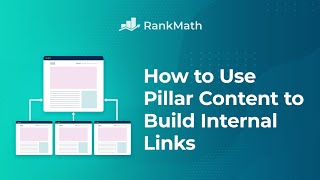
The most effective internal linking structure today is called the topic cluster model (sometimes called hub-and-spoke). Here is how it works:
Step 1: Create a "pillar page", a long, comprehensive guide covering a broad topic. Example: "The Complete Guide to Email Marketing."
Step 2: Write a series of "cluster posts", shorter, more specific articles covering subtopics. Examples: email subject lines, segmentation, deliverability, automation.
Step 3: Link every cluster post back to the pillar page. Link the pillar page out to every cluster post.
Step 4: Link related cluster posts to each other where it makes sense.
This creates a dense web of internal links in one topic area. It concentrates authority onto the pillar page. It signals to Google that your site covers this subject in depth. That depth is what earns rankings for competitive keywords.
Real Company Examples
HubSpot, Topic Cluster Rebuild (2017)
HubSpot completely restructured their blog in 2017 around the topic cluster model. They identified "pillar pages" for broad topics like "email marketing" and "Instagram marketing," then linked every related blog post to the relevant pillar.
Within 8 months of rolling out this structure, HubSpot reported a significant increase in organic traffic. Their blog now drives over 7 million monthly organic visits. Their pillar page for "Instagram marketing" earned top-3 rankings for dozens of competitive keywords, largely because the internal linking architecture concentrated authority onto one authoritative page instead of scattering it across loosely connected posts.
Backlinko's new content launch strategy (2023): Brian Dean at Backlinko used Semrush to identify his highest-authority existing pages. When he published a new guide on Google RankBrain, he added internal links from those high-authority pages to the new post using keyword-rich anchor text. The new guide reached page one of Google despite starting with zero backlinks from other websites. The only boost it received was from strategic internal links from Backlinko's own strongest pages.
General Site Audit Data (Semrush, 2025)
Semrush analyzed sites that implemented structured internal linking strategies. Sites that reorganised content into topic clusters with deliberate pillar-to-cluster linking saw up to 40% improvement in organic visibility within a few months. A blog that added 3 or more contextual links per article (with varied anchor text linking to and from cornerstone content) saw a 30% increase in organic traffic.
Anchor Text: The Overlooked Relevance Signal
Anchor text (the clickable words in a link) is a direct relevance signal to Google about what the destination page covers.
Compare these two versions of the same link:
- Weak anchor text: "To learn more about our pricing, [click here]."
- Strong anchor text: "See our full breakdown of [marketing software pricing options]."
The second version tells Google that the destination page is about "marketing software pricing options." The first tells Google nothing. Multiply that difference across hundreds of internal links on your site and you have a meaningful SEO gap.
Rules for anchor text:
- Use descriptive phrases that match the keywords the destination page targets
- Keep anchor text under 5-6 words
- Vary your anchor text slightly across different links to the same page, exact match on every link looks unnatural
- Never use "click here," "read more," or "learn more" as anchor text
The Three-Click Rule
Any important page on your site should be reachable within 3 clicks from the homepage. This is called the three-click rule (or crawl depth limit).
Why? Google's crawlers prioritise pages that are close to the homepage in link distance. A page that requires 7 clicks to reach gets crawled rarely and receives almost no internal authority flow.
How to fix deep pages:
- Add contextual links to deep pages from high-traffic, well-linked pages
- Restructure your navigation to surface key categories one click from the homepage
- Use site-wide links (sidebar, footer) for your most important standalone pages
Common Mistakes
in an 8-week technical SEO cleanup of its tourism website tens of thousands of orphaned and error pages were dragging down crawl efficiency across the whole site pruned 70% of low-value pages and systematically fixed orphaned and error pages sitewide
Result: its technical SEO health score jumped 850%, from 8 to 76, and error pages fell from 7,817 to 616, a 92% reduction (within 8 weeks).
SourceOrphaned pages, pages with zero internal links pointing to them, are one of the most common SEO errors. A page can have great content but if nothing links to it, Google may never crawl it or may treat it as unimportant. Run a site audit in Ahrefs or Screaming Frog quarterly to find orphaned pages and add contextual links to them from topically related content.
Other common mistakes:
- Generic anchor text everywhere: "click here" and "learn more" are wasted opportunities. Every internal link should use descriptive anchor text.
- Only linking forward, never backward: most teams add links from a new post to older content but forget to go into older posts and link back to the new one. Incoming links from established pages are what immediately signal importance.
- Linking irrelevant pages together: every internal link should make topical sense. Linking your pricing page from a tutorial post about a related tool is good. Linking it from a blog post about company culture is not.
- Too many links per page: Google's John Mueller has said that having hundreds of links on a single page dilutes the value passed to each destination. Keep it to the most useful, relevant links on each page.
- Using nofollow on internal links: nofollow (a link tag that tells Google not to pass authority) is for external links to untrusted sources. Never apply it to internal links on your own site.
Step-by-Step Implementation Process
If you are starting from scratch or auditing an existing site, follow this order:
1. Audit orphaned pages, use Ahrefs Site Audit, Screaming Frog, or Google Search Console to find pages with no internal links pointing to them. Fix those first.
2. Map your topic clusters, list every broad topic your site covers. For each topic, identify which page should be the pillar (most comprehensive) and which posts are cluster content.
3. Build the pillar-to-cluster link web, make sure every cluster post links back to its pillar, and the pillar links out to each cluster post.
4. Audit crawl depth, identify any important pages more than 3 clicks from the homepage. Add links to them from shallower pages.
5. Fix anchor text, search your existing content for links using "click here," "here," or "read more." Replace each with descriptive anchor text.
6. Add the "reverse link" step to your publishing workflow, every time you publish a new post, search your existing content for pages that mention the same topic and add internal links from those older posts to the new one.
7. Review quarterly, check for broken internal links, new orphaned pages, and opportunities to link new content into existing clusters.
The fastest single internal linking win: open Google and search site:yourwebsite.com "keyword" (replacing "keyword" with a term your new page targets). This shows you all existing pages on your site that already mention the topic. Open each one and add a contextual internal link to your new page. Takes 20 minutes and immediately starts passing authority.
The One-Line Takeaway
Internal linking is free PageRank redistribution, the deliberate link architecture you build today decides which of your pages Google chooses to rank tomorrow.
Related Concepts
- On-Page SEO, Internal linking is one of the core on-page signals; optimizing anchor text and link placement sits within the broader on-page SEO practice
- Content Clusters, The topic cluster model is the primary framework for organizing internal linking strategy at scale
- Technical SEO, Site architecture, crawl depth, and link equity flow are technical SEO concerns that internal linking directly shapes